Why Mobile Photo Editing Matters More Than Ever
Smartphone cameras have become remarkably capable. Modern devices can capture RAW images, simulate shallow depth of field, and produce low-light photos that would have seemed impossible just a few years ago.
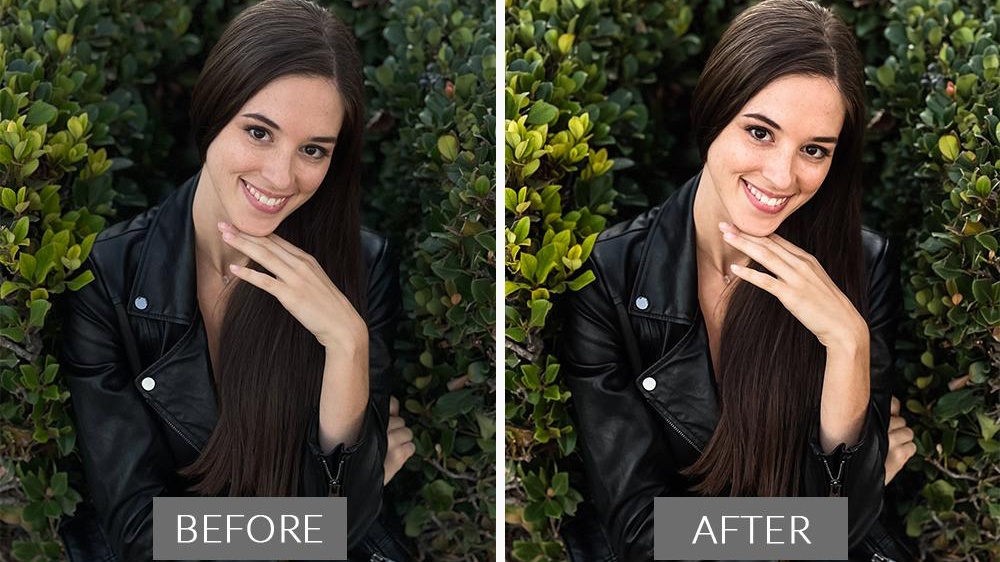
The problem is that even the best smartphone cameras rarely produce a finished image straight out of the camera. Exposure adjustments, color grading, object removal, sharpening, and selective edits often make the difference between a snapshot and a photograph worth sharing.
To find the best mobile photography editing tools, testing focused on four key criteria:
Image quality and editing power
Ease of use on mobile devices
Support for RAW photography
Value relative to pricing
The following apps are actively maintained, available on the US Apple App Store and Google Play Store, and widely used by both casual photographers and serious enthusiasts.
Pricing
Free version available
Premium subscription through Adobe Photography Plan
The Reality Check: What Actually Works?
When testing dozens of photos captured across different lighting conditions, Lightroom consistently delivered the best balance between professional power and mobile usability.
The app's RAW editing capabilities remain among the strongest available on smartphones. Exposure recovery, highlight control, color grading, masking tools, and AI-powered subject selection work exceptionally well.
Cloud synchronization is another major advantage. Edits made on a phone can seamlessly appear on tablets and desktop computers.
Pros
Industry-leading RAW editing
Excellent masking tools
Powerful color grading
AI-powered editing features
Cross-device synchronization
Professional workflow support
Cons
Best features require subscription
Beginners may feel overwhelmed
Cloud storage depends on Adobe plans
Verdict
For serious mobile photographers, Lightroom remains the benchmark against which other editing apps are measured.
Pricing
Completely Free
The Reality Check: What Actually Works?
Snapseed remains one of the most impressive free editing apps ever released.
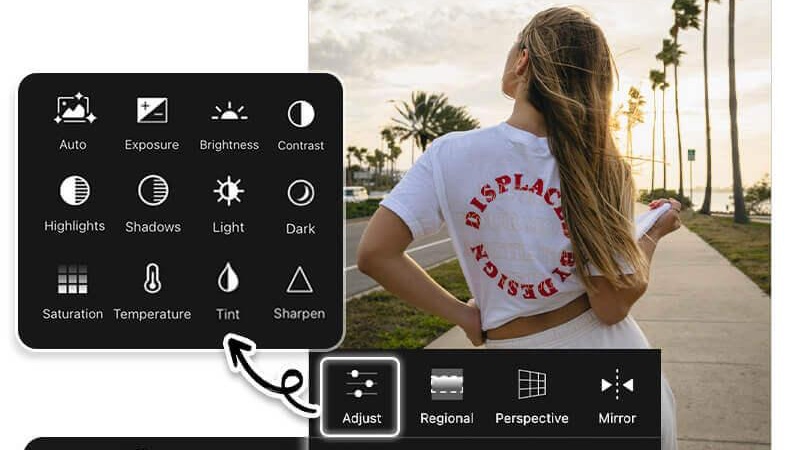
During testing, the Selective tool, Healing tool, and Curves adjustments consistently produced results that rival many paid alternatives. The interface remains approachable while still offering advanced editing controls.
For photographers who want powerful editing without subscriptions, Snapseed continues to be difficult to beat.
Pros
Completely free
No subscription required
Excellent selective editing tools
Supports RAW files
Clean interface
Powerful healing tool
Cons
Development updates are infrequent
No cloud synchronization
Limited AI features compared to newer competitors
Verdict
Snapseed is still the best free mobile photo editor available.
Pricing
Free version available
VSCO Membership subscription
The Reality Check: What Actually Works?
VSCO has long been known for its film-inspired presets, but testing revealed that its strength extends beyond filters.
The app excels at helping photographers create consistent visual styles across entire photo collections. Its preset library is among the best available, particularly for portrait, travel, and lifestyle photography.
Many social media creators continue to use VSCO because it offers a polished look without requiring extensive editing expertise.
Pros
Outstanding preset library
Beautiful interface
Consistent color grading
Good video editing support
Active creative community
Cons
Many presets require subscription
Less advanced than Lightroom
Limited organizational features
Verdict
VSCO is ideal for photographers who prioritize visual style and fast workflows.
Pricing
Free download
Subscription or lifetime purchase available
The Reality Check: What Actually Works?
Photomator has become one of the strongest alternatives to Lightroom within the Apple ecosystem.
Testing showed particularly strong performance in AI-powered enhancements. Features such as automatic color correction, object removal, super resolution, and intelligent adjustments often reduced editing time significantly.
The app also integrates well with Apple Photos, making it attractive for iPhone photographers who want advanced editing without leaving the Apple ecosystem.
Pros
Excellent AI editing tools
Lifetime purchase option available
Apple Photos integration
Strong RAW support
Fast performance
Cons
iOS only
Smaller ecosystem than Adobe
Advanced workflows less mature than Lightroom
Verdict
For iPhone users, Photomator is one of the most compelling photo editors currently available.
Pricing
Free version available
PicsArt Gold subscription
The Reality Check: What Actually Works?
Not every photographer wants traditional editing tools.
During testing, PicsArt excelled at creative editing, AI-powered effects, background replacement, object removal, and social-media-ready designs.
While professional photographers may prefer Lightroom, content creators often appreciate PicsArt's ability to quickly produce eye-catching images for Instagram, TikTok, and other platforms.
Pros
Powerful AI features
Extensive creative tools
Background replacement
Object removal
Social media templates
Cons
Subscription heavily promoted
Interface can feel crowded
Less focused on professional photography workflows
Verdict
PicsArt is best suited for creators who want creative flexibility rather than traditional photo processing.

For most smartphone photographers, the answer depends on editing goals rather than device choice.
Best Overall Mobile Photo Editor
Adobe Lightroom Mobile
Its RAW editing tools, masking capabilities, cloud synchronization, and professional workflow support make it the strongest all-around editing solution available today.
Best Free Photo Editing App
Snapseed
The combination of powerful editing tools and a completely free pricing model remains unmatched.
Best for Creative Color Grading
VSCO
Its film-inspired presets and consistent visual style make it a favorite among lifestyle and travel photographers.
Best for iPhone Users
Photomator
AI-powered enhancements and deep Apple integration create an outstanding editing experience for iPhone and iPad owners.
Best for Social Media Creators
PicsArt
Creative effects, AI tools, and design-focused features make it ideal for content creation.
For most photographers in 2026, the most effective setup is Lightroom Mobile paired with Snapseed. Lightroom handles advanced RAW processing and professional edits, while Snapseed provides quick adjustments and selective corrections without adding another subscription. Together, they offer a mobile editing workflow that rivals what many photographers once needed a desktop computer to achieve.
