For most people, getting from Point A to Point B is a minor inconvenience.
For wheelchair users, it can be the difference between a smooth afternoon and a completely derailed plan.
A route that looks simple on a map can hide all sorts of surprises: a subway elevator that's out of service, a restaurant with a single step at the entrance, a missing curb cut, or a narrow restroom that turns an otherwise accessible venue into a dead end.
The frustrating part? Most navigation apps don't see those obstacles.
Traditional mapping platforms are excellent at calculating distance and travel time, but they're often blind to the details that matter most when accessibility is on the line. A route may technically exist. That doesn't mean it's actually usable.
That's why many wheelchair users rely on a different set of tools—apps built specifically to surface accessibility information that standard maps frequently overlook.
We reviewed some of the strongest options available for navigating cities with greater confidence and fewer unpleasant surprises.
Disclaimer: These apps are designed for trip planning and accessibility research. They do not provide legal, medical, engineering, or regulatory guidance. Accessibility conditions can change quickly, so it's always wise to verify critical information before visiting an unfamiliar location.
Available on: iOS and Android
Cost: Free
Google Maps may not have been created specifically for wheelchair users, but it's become one of the most valuable accessibility tools available.
The reason is simple: scale.
When the Accessible Places feature is enabled, businesses that have confirmed wheelchair-accessible entrances are marked directly on the map. That alone can save a tremendous amount of time when researching unfamiliar neighborhoods.
The transit features are equally helpful. In many major U.S. cities, users can filter routes to prioritize wheelchair-accessible public transportation options, helping avoid stations that lack elevator access.
And then there's Street View.
Before committing to a destination, you can often inspect the entrance yourself, zoom in on the curb design, check sidewalk conditions, or get a sense of whether a location looks manageable before leaving home.
Massive, frequently updated mapping database.
Accessible transit routing in many major metropolitan areas.
Street View helps identify potential barriers before arrival.
Useful for both everyday errands and travel planning.
Real-time elevator outages aren't always reflected immediately.
Accessibility information typically stops at the front door.
Interior details such as restroom layouts, table spacing, or door weight are often unavailable.
Available on: Android
Cost: Free
Google Maps can tell you where a place is.
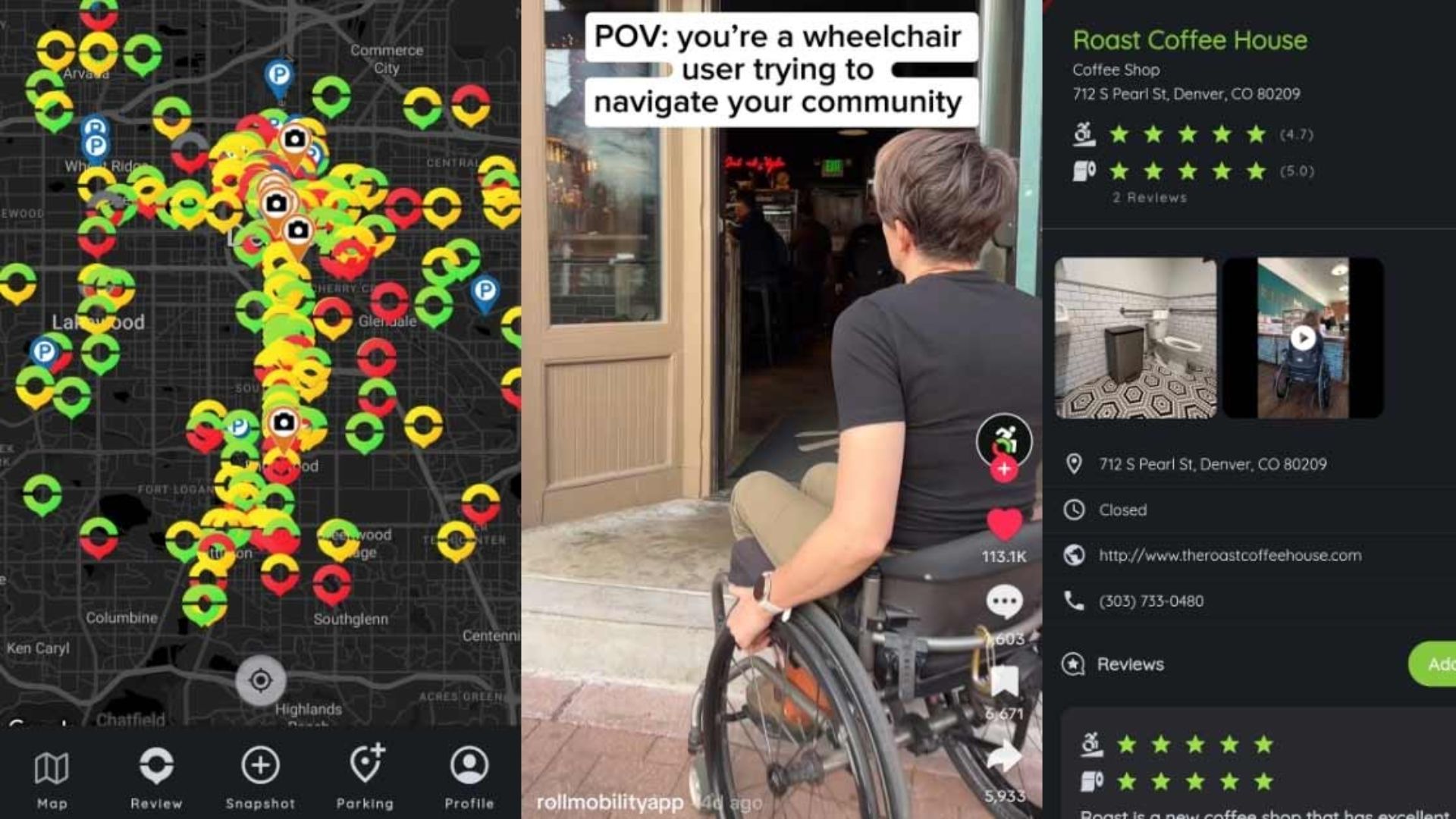
iAccess Life helps answer a more important question: Can you actually use it comfortably once you get there?
The platform was built with accessibility at its core and relies heavily on community feedback. Rather than reducing accessibility to a simple yes-or-no label, it breaks the experience into several practical categories that matter in real life.
Users rate entrances, parking, restrooms, and seating independently.
That distinction matters.
A restaurant might have a perfect entrance ramp but a restroom that's impossible to navigate. Another location might offer accessible parking yet have cramped seating arrangements inside. Those nuances often determine whether a venue works in practice.
Detailed ratings that go far beyond basic accessibility labels.
Community-driven insights from people with firsthand experience.
Easy search tools for finding highly rated accessible locations.
Particularly useful when researching restaurants, stores, and public venues.
Coverage varies significantly depending on location.
Major cities generally have far more reviews than smaller communities.
Focuses on destinations rather than sidewalk-by-sidewalk navigation.
Available on: iOS and Android
Cost: Free
Sometimes you don't want a lengthy review.
You just want a quick answer.
Wheelmap excels at delivering exactly that.
Built on OpenStreetMap data, the app uses a simple traffic-light system to classify locations:
Green: Accessible
Yellow: Partially accessible
Red: Not accessible
The visual format makes it easy to scan an unfamiliar area and identify potential options without digging through paragraphs of user comments.
Whether you're searching for a café, grocery store, parking location, or public restroom, Wheelmap offers a fast snapshot of what's nearby and what may present obstacles.
Extremely easy to understand at a glance.
Excellent for quick decision-making while on the move.
Strong focus on public facilities and restrooms.
Open-source approach encourages broad community participation.
Accessibility needs vary widely, and a "partially accessible" rating may mean very different things to different users.
Community updates are generally reliable but may occasionally lag behind recent renovations or changes.
Less detailed than review-focused platforms.

Available on: iOS and Android
Cost: Free
AccessNow takes a broader approach to accessibility.
Instead of focusing only on ramps and entrances, it allows users to search for specific accessibility features that may be essential to their individual needs.
Looking for automatic doors? Accessible washrooms? Braille signage? Service-animal-friendly spaces? AccessNow makes those filters part of the search process.
That level of customization can be incredibly helpful when planning a day that involves multiple stops across a city.
Rather than researching every destination separately, users can build an itinerary around locations that already meet their requirements.
Extensive filtering options.
Helpful for planning complex outings and travel days.
Modern interface with strong accessibility support.
Useful across many major U.S. and international cities.
Data coverage tends to be strongest in popular urban and tourist areas.
Residential neighborhoods may have fewer documented locations.
User-generated photos can sometimes load slowly on weaker connections.
Accessible travel isn't just about getting somewhere.
It's about knowing what you'll encounter when you arrive.
That's why the most effective strategy usually combines two different types of tools: one for route planning and another for destination verification.
For navigating streets, public transportation systems, and unfamiliar neighborhoods, Google Maps remains the foundation. Its accessibility features, transit filters, and Street View capabilities make it one of the most practical tools available.
But when the goal is understanding the real-world experience inside a venue, iAccess Life stands out.
Its detailed ratings for entrances, parking, restrooms, and seating provide the kind of information that standard mapping apps rarely capture. And for many wheelchair users, those details aren't nice to have—they're the difference between a successful outing and a wasted trip.
Good accessibility information removes uncertainty. The best apps don't just help people find places. They help people move through the world with greater confidence.