Pottery and ceramic art have become increasingly digital—not because artists are replacing clay with screens, but because managing projects has become far more complex.
A serious ceramic studio may have dozens of pieces moving through different stages at once: wet clay, leather-hard work, bisque firing, glazing, kiln schedules, customer commissions, inventory tracking, and sales records. Add sculptural projects, glaze testing, and firing logs, and a simple notebook quickly becomes inadequate.
To identify the best apps for advanced clay sculpting and pottery workflow management, we evaluated apps based on five criteria:
Project organization capabilities
Studio workflow management
Photo documentation tools
Inventory and firing tracking
Real-world usefulness for working ceramic artists
The following apps are actively available on the Apple App Store or Google Play Store and provide genuine value for potters, ceramic sculptors, and studio owners.

Pricing
Free download
Premium subscription available for expanded functionality
The Reality Check: What Actually Works?
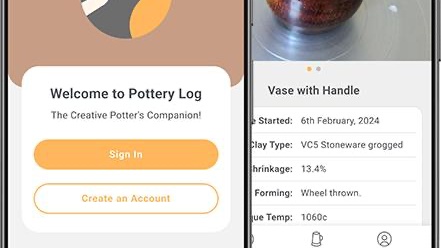
Among pottery-specific apps, Pottery Log is one of the few designed specifically around a ceramic workflow.
During testing, its strongest feature was stage tracking. Users can document pieces from initial creation through trimming, bisque firing, glazing, glaze firing, and final completion. Photos, clay body information, glaze recipes, firing notes, dimensions, and customer information can all be attached to individual projects.
For artists managing multiple kiln loads simultaneously, this level of organization is genuinely useful.
Pros
Built specifically for ceramic artists
Excellent project lifecycle tracking
Supports photos and firing notes
Helps reduce forgotten pieces
Useful glaze documentation
Cons
Some advanced features require subscription
Interface is functional rather than beautiful
Less useful for non-ceramic sculpture workflows
Verdict
For dedicated potters, this is one of the closest things available to a digital studio notebook.
Pricing
Free download
Subscription options available
The Reality Check: What Actually Works?
ClayLab focuses heavily on studio organization.
When tested with multiple ceramic projects, the app excelled at cataloging works, recording glaze combinations, tracking firing stages, and maintaining historical records of completed pieces.
One particularly useful feature is the ability to maintain a visual archive. Ceramic artists often need to recreate successful glaze combinations months later, and ClayLab makes that process significantly easier.
Pros
Designed for ceramics
Strong visual documentation
Helpful glaze tracking
Project history management
Modern interface
Cons
iOS only
Subscription required for full feature access
Smaller user community than general productivity apps
Verdict
A strong option for ceramic artists who prioritize detailed documentation and visual records.
Pricing
Free personal plan
Paid subscription tiers available
The Reality Check: What Actually Works?
Notion is not a pottery app, yet it repeatedly proved useful during testing.
Advanced ceramic artists often need much more than firing logs. They may track commissions, inventory, studio expenses, teaching schedules, gallery submissions, glaze recipes, customer orders, and production timelines.
Notion's database system handles all of these exceptionally well.
Custom workflows can be built for sculpture projects, glaze testing, kiln scheduling, and exhibition planning.
Pros
Extremely flexible
Excellent database features
Supports images and documents
Powerful project management
Free tier is generous
Cons
Requires setup time
No pottery-specific templates by default
Can feel overwhelming initially
Verdict
For studio owners and professional ceramic artists, Notion may be the most versatile management tool available.

Pricing
Free plan available
Premium subscriptions available
The Reality Check: What Actually Works?
Ceramic projects naturally move through stages, making Trello surprisingly effective.
During testing, artists created boards representing clay preparation, sculpting, drying, bisque firing, glazing, kiln loading, and finished work. Cards could then move through each stage visually.
For artists who think visually rather than through spreadsheets, Trello's workflow model feels intuitive.
Pros
Easy to learn
Excellent visual workflow tracking
Strong collaboration features
Free version is capable
Works well for commissions
Cons
Limited pottery-specific tools
Inventory tracking requires customization
Less detailed than dedicated ceramic apps
Verdict
A practical solution for artists managing many simultaneous projects.
Pricing
Free plan available
Canva Pro subscription available
The Reality Check: What Actually Works?
Many ceramic artists eventually discover that creating the work is only half the challenge.
Documenting finished pieces, maintaining portfolios, producing market materials, and organizing social media content are equally important.
During testing, Canva consistently simplified the presentation side of pottery businesses. Artists could create project boards, glaze reference sheets, commission presentations, exhibition materials, and portfolio pages quickly.
Pros
Excellent visual documentation tools
Great for portfolios
Useful marketing features
Easy to use
Strong free tier
Cons
Not a project management platform
No kiln or glaze tracking
Subscription unlocks many premium assets
Verdict
An outstanding companion tool for documenting and showcasing ceramic work.
Different types of ceramic artists need different solutions.
Best Overall for Pottery Project Management
Pottery Log
Its pottery-specific workflow, firing documentation, glaze tracking, and project lifecycle management make it the strongest dedicated solution available.
Best for Detailed Ceramic Documentation
ClayLab
Excellent for maintaining long-term records of glaze tests and completed pieces.
Best for Professional Studio Management
Notion
The flexibility to track commissions, inventory, firing schedules, recipes, and business operations makes it incredibly powerful for advanced users.
Best Visual Workflow Tool
Trello
An intuitive option for tracking pieces through multiple studio stages.
Best for Portfolio and Presentation
Canva
Ideal for documenting, organizing, and showcasing finished work.
For most serious ceramic artists in 2026, the most effective setup is actually a combination of Pottery Log and Notion. Pottery Log handles the clay-specific workflow, while Notion manages the broader business side of a studio. Together, they create a powerful digital system capable of supporting everything from individual sculptures to large-scale pottery production operations.