Learning a mainstream instrument like the guitar or piano in the digital age is relatively straightforward. Gamified software will listen to a user's playing, correct mistakes, and guide them through structured chord progressions. However, dusting off a five-string banjo or trying to navigate the intimidating fretboard of a pedal steel guitar reveals a stark reality: mainstream music learning platforms rarely cater to niche American roots instruments.
When conducting a comprehensive search to find the ultimate digital learning companions for these intricate instruments, strict testing criteria must be established. Musicians do not need static PDF chord books or basic metronomes. The goal is to find apps that offer authentic interactive feedback—whether through specialized, algorithmic practice tools that react to a player's proficiency or through direct asynchronous video critiques from master instructors. After an exhaustive analysis of the limited options on the iOS and Android marketplaces to see how they handle the syncopated rolls of Bluegrass or the complex "copedent" setups of steel guitars, three exceptional platforms emerged that successfully bridge the gap between traditional American folk music and modern app technology.
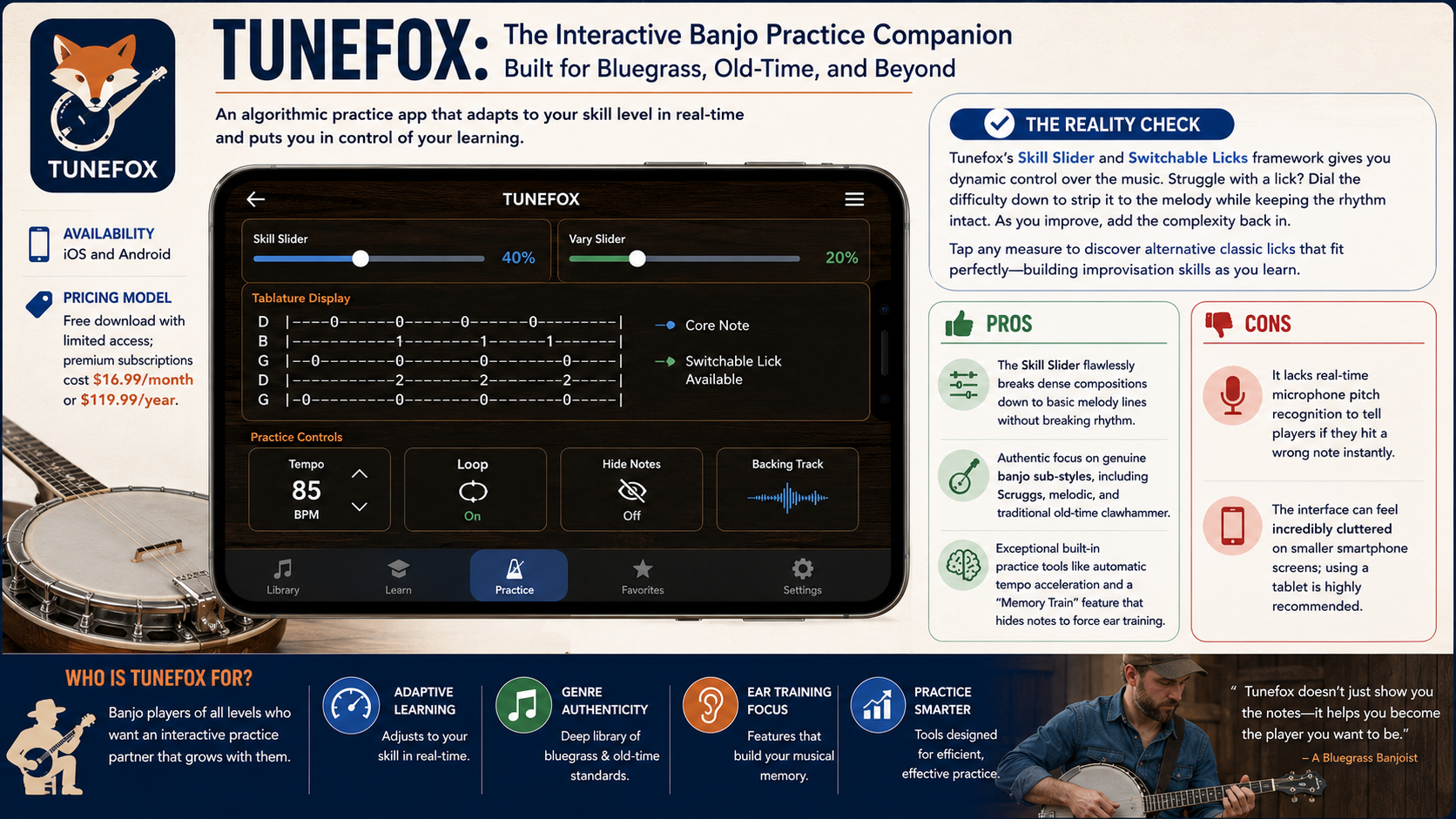
Pricing Model: Free download with limited access; premium subscriptions cost $16.99/month or $119.99/year.
When evaluating Tunefox with a five-string resonator banjo, it becomes immediately clear that this app is not a cheap clone of mainstream scrolling-tab software. Tunefox was built from the ground up specifically for folk and bluegrass musicians, focusing heavily on three-finger Scruggs style, melodic style, and old-time clawhammer banjo.
The standout feature that delivers genuine results is the algorithmic Skill Slider and Switchable Licks framework. Instead of forcing a player to listen to their instrument and grading them with a simple "right or wrong" green light, Tunefox provides responsive feedback by allowing users to systematically simplify or complicate a song in real-time. If a student struggles to keep up with a standard three-finger forward roll on a tune like "Cripple Creek," sliding the Skill Slider down strips away the auxiliary filler notes, leaving only the bare-bones melody.
As timing improves against the backing tracks, the user can slide it up to add complex bluegrass vocabulary back into the piece. Tapping on specific measures reveals alternative classic licks that fit perfectly over that specific chord structure, giving musicians immediate interactive control over learning improvisation—a core element of traditional American music.
Pros:
The Skill Slider flawlessly breaks dense compositions down to basic melody lines without breaking rhythm.
Authentic focus on genuine banjo sub-styles, including Scruggs, melodic, and traditional old-time clawhammer.
Exceptional built-in practice tools like automatic tempo acceleration and a "Memory Train" feature that hides notes to force ear training.
Cons:
It lacks real-time microphone pitch recognition to tell players if they hit a wrong note instantly.
The interface can feel incredibly cluttered on smaller smartphone screens; using a tablet is highly recommended.

Availability: iOS (via the operational ArtistWorks app and mobile web portal)
Pricing Model: Subscription-based only; plans typically range from $105 for 3 months to $279 for an annual membership.
If an individual has ever tried to self-teach the pedal steel guitar or bluegrass banjo using automated audio-recognition apps, they know these systems fail miserably in niche contexts. They cannot discern if a player is dampening strings correctly with their right palm or if their foot pedal timing is causing the intonation to slide flat. ArtistWorks addresses this by providing the ultimate learning feedback mechanism: personalized Video Exchange feedback from world-renowned roots musicians like master banjoist Tony Trischka and Grammy-winner Noam Pikelny.
The engine driving this platform is the Asynchronous Video Exchange Learning loop. Students work through a structured, pre-recorded video curriculum ranging from basic instrument tuning to advanced chromatic runs. When a specific technique trips them up, they use their device's camera to record a short clip of their playing and submit it directly through the app.
A few days later, a master instructor responds with a customized video analysis. The instructor breaks down the performance frame by frame, explicitly identifying issues with picking posture and providing corrective exercises. Furthermore, every video exchange is logged into a shared public archive, allowing students to interactively browse through thousands of video critiques given to peers working through the exact same trouble spots.
Pros:
Unparalleled instructional feedback from legendary players that no algorithm can emulate.
Massive, searchable database of peer video exchanges that answer almost any technical issue a student encounters.
The curriculum covers everything from historical context to the physical anatomy of niche instruments.
Cons:
High financial barrier to entry compared to standard app store pricing models.
No instant, gamified visual interface; responses require patience and a few days of processing time.
Pricing Model: Free download; completely free utility.
The pedal steel guitar is widely regarded as one of the most mechanically and conceptually difficult instruments on earth. It utilizes a complex grid of 10 or 12 strings, multiple foot pedals, and knee levers that mechanically alter the pitch of specific strings mid-song. Steel Sidekick, developed by John Sohn, functions as an interactive visual and audio mapping tool designed specifically to conquer this steep learning curve.
The core feature of Steel Sidekick that makes it indispensable is the Interactive Copedent Map. A "copedent" is the chord-pedal-arrangement chart unique to steel guitars.
When a user selects a standard setup (like the classic 10-string E9 tuning) and taps on virtual foot pedals or knee levers within the app, the interface immediately transforms. It visually and audibly reflects exactly how the notes across all frets shift up or down. For a player practicing physical mechanics on their physical instrument, this immediate visual feedback solves the frustrating mystery of finding hidden chord voicings and intervals across an otherwise chaotic fretboard.
Pros:
Includes pre-loaded support for complex traditional tunings like E9, C6, and Universal 12-string variations.
Allows musicians to program custom configurations to match their physical instrument's unique modifications.
Lightweight, highly responsive, and completely devoid of distracting ads or hidden paywalls.
Cons:
The design language looks dated, prioritizing functional layout over modern aesthetic appeal.
It operates strictly as a reference utility; there are no step-by-step playing tracks or active lesson modules.
Choosing the right digital platform ultimately depends on whether a musician values real-time arrangement manipulation or deep technical precision.
If the primary goal is to master the five-string banjo, Tunefox stands out as the absolute best app for this specific scenario. Its proprietary Skill Slider addresses the primary hurdle of traditional roots music: transitioning from slow, robotic practice to fluid, up-tempo jamming. By giving the player immediate control over tab density and improvisational licks, it mimics the natural evolutionary process of learning folk music by ear.
However, if a musician is tackling an instrument with brutal mechanical demands like the pedal steel guitar—where minor microtonal errors can ruin a performance—the computational feedback of standard apps falls short. In that realm, pairing Steel Sidekick as a daily interactive fretboard map alongside a subscription to ArtistWorks for human-expert video critique is the most effective approach to mastering America's niche musical traditions.